Awesome Cursor Training Tutorial: How Cursor Scales RL for AI-Powered Code Assistance
Zhan Shi, Rui Sun, Bing He
This article is also available as a GitHub repository: Gitsamshi/awesome_cursor_tutorial. Based on insights from Ray Summit 2025.
A comprehensive guide to understanding how Cursor scales Reinforcement Learning (RL) for AI-powered code assistance.
1. Overview
This tutorial documents the architecture and methodologies behind Cursor’s reinforcement learning system. Cursor uses a sophisticated RL pipeline that trains AI models to become better coding assistants by learning from real-world interactions in a production-like environment.
The system consists of three main components working in harmony:
- Trainer: Handles model training with custom optimizations
- Inference: Manages model deployment and load balancing
- Environment: Provides a production-grade agent server for realistic training
2. Architecture
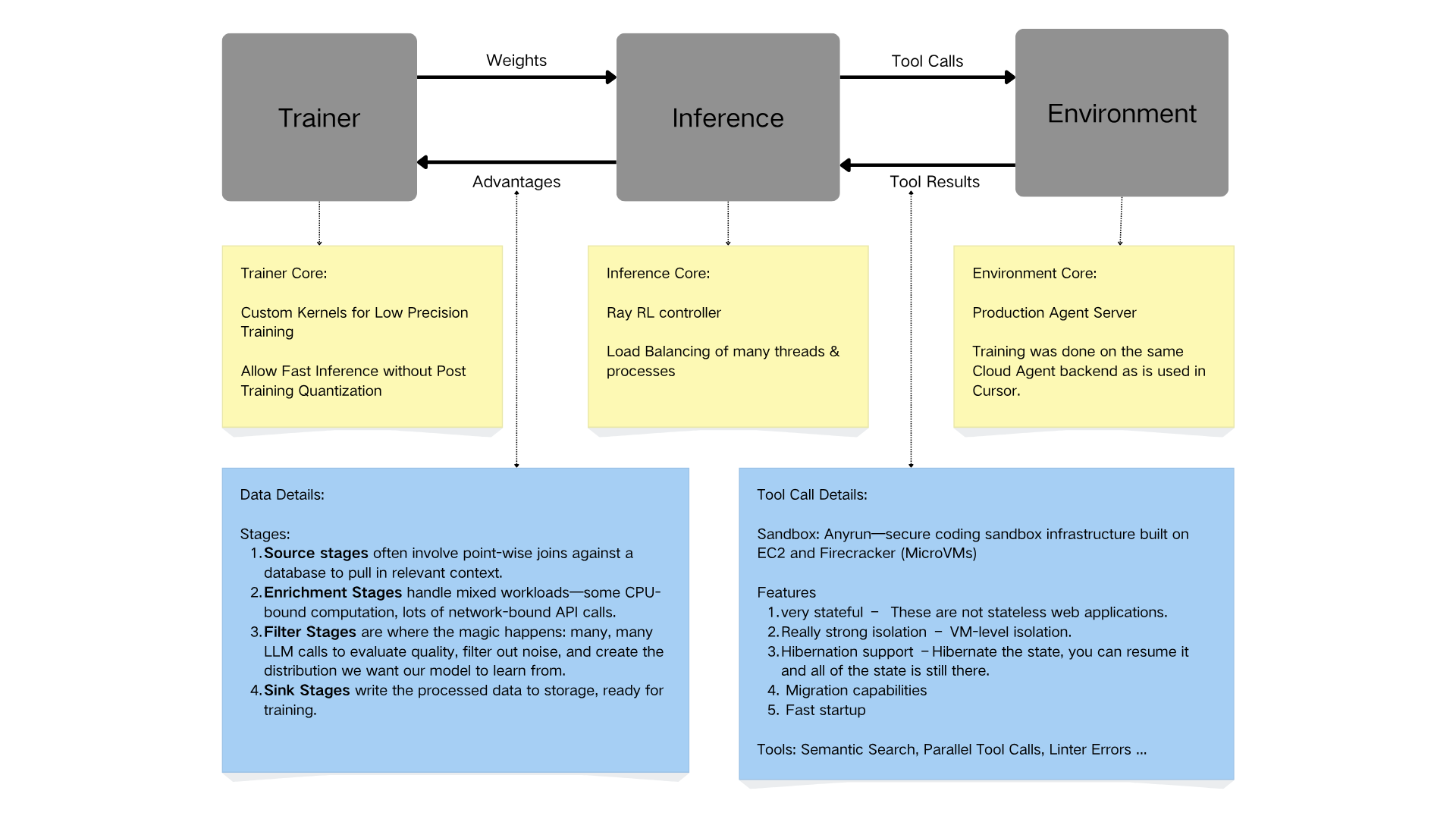
The architecture shows how the three main components interact, along with their core features and implementation details.
2.1 Trainer
The training component implements cutting-edge optimizations for efficient model training.
Core features:
- Custom kernels for low-precision training — specialized CUDA kernels optimized for reduced precision arithmetic that maintain model quality while significantly reducing training time and enabling efficient use of GPU resources.
- Fast inference without post-training quantization — models are trained in a way that allows direct deployment, eliminating post-training quantization steps and reducing deployment pipeline complexity.
Training data pipeline. The trainer processes data through four distinct stages:
- Source stages — point-wise joins against a database to pull in relevant context, aggregate historical interaction data, and filter relevant training examples.
- Enrichment stages — handles mixed workloads efficiently: CPU-bound computation (data preprocessing, feature extraction) and network-bound API calls (external service integrations, context gathering), with parallel processing to maximize throughput.
- Filter stages — quality evaluation via multiple LLM calls, noise reduction to remove low-quality examples, and distribution creation to shape the training data toward desired model behavior.
- Sink stages — writes processed data to storage in optimized formats for fast loading during training, with versioning and checkpointing for reproducibility.
Ray Data pipelines at Cursor move millions of rows of text data through many stages (e.g., up to 20 different stages), enabling efficient distributed data processing at scale.
2.2 Inference
The inference system is built on Ray for scalable, production-grade model serving.
Core features:
- Ray RL Controller — distributed reinforcement learning orchestration, complex multi-agent coordination, and seamless scaling across multiple machines.
- Load balancing — manages many threads and processes efficiently with dynamic resource allocation, ensuring low latency and high throughput.
Workflow:
- Receives model weights from the trainer
- Deploys models across distributed infrastructure
- Handles tool call requests from the environment
- Returns tool execution results and model predictions
2.3 Environment
The environment is where the AI agent actually “lives” and interacts.
Core features:
- Production agent server — training occurs on the same Cloud Agent backend used in Cursor, ensuring the training distribution matches real-world usage and eliminating the sim-to-real gap common in RL systems.
- Realistic tool execution — the agent interacts with actual development tools, receives real feedback from code execution, and learns from authentic user scenarios.
3. Tool Call Infrastructure
3.1 Sandbox: Anyrun
Cursor uses a secure coding sandbox infrastructure called Anyrun, built on:
- EC2: AWS compute instances for scalability
- Firecracker: Lightweight microVM technology for isolation
3.2 Security & Isolation Features
- Stateful execution — not stateless web applications: a full stateful environment that maintains context across multiple interactions and preserves file systems, environment variables, and process states.
- VM-level isolation — strong security boundaries between different executions, preventing cross-contamination between training episodes and protecting sensitive code and data.
- Hibernation support — pause and resume: hibernate the VM state mid-execution with all state preserved (memory, disk, processes), enabling efficient resource usage and cost optimization.
- Migration capabilities — move running VMs between physical hosts, enabling load balancing and maintenance without interruption and supporting elastic scaling.
- Fast startup — quick VM initialization for responsive training, with optimized boot times using Firecracker’s microVM technology to reduce training iteration time.
3.3 Available Tools
The agent has access to a comprehensive suite of development tools:
- Semantic Search: Find code by meaning, not just text matching
- Parallel Tool Calls: Execute multiple operations simultaneously
- Linter Errors: Access to real-time code quality feedback
- File Operations: Read, write, search, and modify files
- Terminal Commands: Execute shell commands in sandboxed environments
- Codebase Search: Navigate and understand large codebases
- And more: Extensive tool library mirroring real development workflows
4. Key Innovations
Production-aligned training. Unlike traditional RL setups that train in simplified simulations, Cursor trains on the actual production infrastructure: zero sim-to-real transfer gap, models that work immediately in production, and training on real user scenarios and edge cases.
Efficient low-precision training. Custom kernels allow training at lower precision without sacrificing model quality: faster training iterations, reduced GPU memory requirements, lower computational costs, and no post-training quantization needed.
Scalable inference. Ray-based inference infrastructure provides horizontal scaling across many machines, efficient load balancing, high throughput for training data collection, and a production-ready deployment pipeline.
Intelligent data filtering. A multi-stage pipeline with LLM-based quality checks ensures high-quality training data, appropriate difficulty distribution, removal of noisy or incorrect examples, and continuous improvement of data quality.
Secure sandbox execution. The Anyrun sandbox provides the best of both worlds: security (strong isolation via Firecracker microVMs), functionality (full stateful execution environment), performance (fast startup and migration), and flexibility (hibernation and resumption).
5. Getting Started
Understanding the architecture:
- Start with the Data Pipeline: Understand how raw data is transformed into high-quality training examples
- Explore the Trainer: Learn about custom kernels and training optimizations
- Study the Inference System: Examine how Ray enables scalable model serving
- Investigate the Environment: See how production-aligned training works
- Experiment with Tools: Try out the various development tools available to the agent
Key concepts to master:
- Reinforcement Learning Basics: Policy gradients, value functions, reward shaping
- Distributed Training: Data parallelism, model parallelism, pipeline parallelism
- Ray Framework: Actor model, distributed scheduling, fault tolerance
- Code Understanding: AST parsing, semantic search, program analysis
- Sandbox Technology: Firecracker, microVMs, container isolation
6. Additional Resources
- Ray Documentation
- Firecracker Documentation
- Reinforcement Learning: An Introduction
- Cursor Documentation
Reference
Originally published as a GitHub repository: Gitsamshi/awesome_cursor_tutorial, Nov 2025. This tutorial is for educational purposes.